Know when you're talking too fast. Before anyone else does.
Too Fast listens from your menu bar and shows your speaking pace live. A needle that climbs, a quiet cue, a tap on the wrist. Built by someone who clutters, for calls, meetings and the stage.
Everything runs on your Mac. Nothing is recorded or uploaded.
3.3Wed 10 Dec14:32
3.3syl/s
Good pace
Simulated reading. The red stretch is where the sentence sped up.
If you clutter
Cluttering makes speech fast, uneven, and hard to follow, often without you noticing. Too Fast gives you the outside ear you can't have in the moment. Learn more at toofastforwords.com.
If you rush on calls
Nerves, enthusiasm, a packed agenda. The needle in your menu bar shows when you've picked up speed, so you can breathe before the other side has to ask you to repeat.
If you speak on stage
Start a Keynote or PowerPoint slide show and it switches to your presentation pace on its own. A floating gauge only you can see, and a tap on your wrist when you need it.
How it works
Calibrate once. Then just talk.
The app counts syllables straight from the sound of your voice. No speech recognition, no cloud, no language setting. It works the same in English, Dutch, or anything else.
STEP 1
Read a short passage
Read it the way you want to sound. Twenty seconds is enough. Your comfortable pace becomes the baseline, one for conversations and one for presentations.
STEP 2
Start listening
From the menu bar, the shortcut, or automatically when a slide show begins. The needle follows your pace ten times a second.
STEP 3
Glance, or feel it
Green, amber, red in the menu bar. A floating gauge above your slides. A soft two‑note cue if you want one. A tap on your Apple Watch when you've been fast for more than a moment.
The Monitor window. Most of the time you'll never open it. The menu bar needle is enough.Conversation profile · baseline 3.3
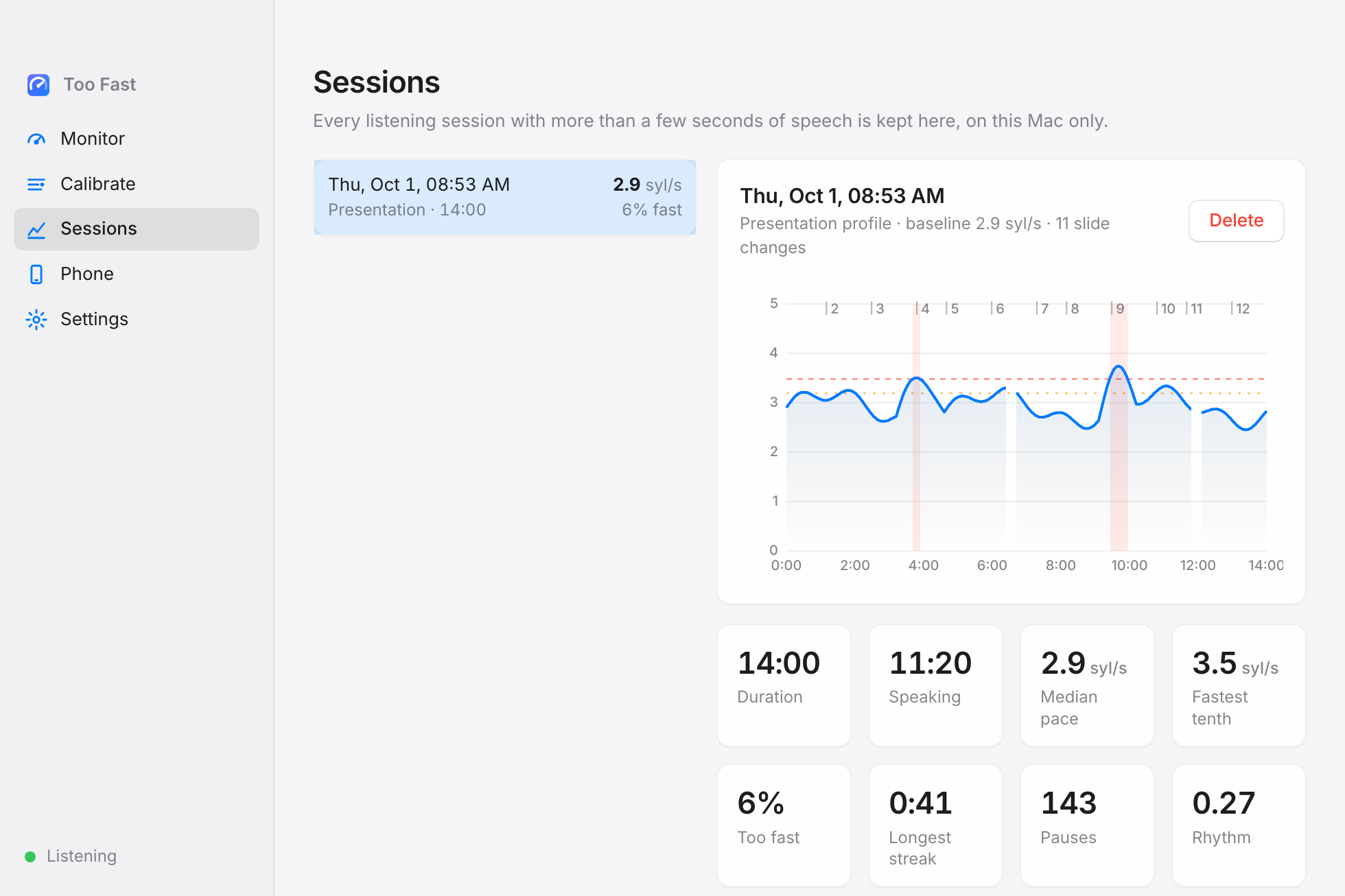
Afterwards, every talk and call becomes a chart. The red stretches are where you sped up; the dotted lines are slide changes.Presentation · 14:00 · 6% too fast
Features
Small on purpose. Everything it does, it does quietly.
Menu bar needle
A monochrome gauge that fits in with your other icons. The needle moves with your pace. Show the number next to it if you like.
Floating gauge
Stays above fullscreen Keynote and PowerPoint, on every Space. Hidden from screen sharing and the projector by default, so only you see it.
Knows when you present
A slide show starting switches to your presentation pace, starts listening, and marks every slide change in the session.
Sessions you can learn from
A pace chart for every talk and call, fast stretches shaded, slide markers on top. Median pace, share of time too fast, longest streak, pauses.
Your pace, not a textbook
Calibrate by reading a passage in English or Dutch. Separate baselines for conversations and presentations, with a tolerance you set.
Gentle cues
A soft two‑note sound when you cross the line, a quiet tick while you stay there. Optional, and never during calibration.
Phone on the lectern
Pick your Mac in the iPhone app and enter its pairing code once. The phone shows the gauge, and Start and Stop on either one control both. Or let it listen with its own microphone.
Apple Watch taps
A double tap when you cross into too fast, a quiet repeat while you stay there, also with your arm down. Nobody in the room notices.
What it measures
Syllables per second, with the pauses taken out.
Speech therapists call it articulation rate. It is a better yardstick than words per minute because cluttering swallows syllables: the word count looks normal while the speech isn't.
Too Fast finds the loud vowel peaks in the 300 to 3000 Hz band, where syllables carry their energy, and counts them. It also watches how evenly they are spaced, since cluttering tends to come in bursts, and how often you pause.
You are too fast when your smoothed pace stays above your limit for a second and a half. It lets go with some hysteresis, so the gauge never flickers mid‑sentence.
Situation
Typical speakers
Default target
Relaxed conversation
4.0 to 5.0
3.3 too fast from 4.0
Presentation or teaching
3.3 to 4.0
2.9 too fast from 3.5
Cluttering episode
5.5 and up, or very uneven
calibrate to replace the defaults
Mirror MacThis phone
Too fast
Listening…
Stop
4.3Too fast
iPhone and Apple Watch
Feedback you can feel, wherever you speak.
The iPhone app runs the same detector on the phone's microphone, so it works on a walk, in a meeting room, or anywhere the Mac isn't. It keeps listening with the screen locked.
Mirror the Mac over Wi‑Fi, protected by a pairing code, or listen on the phone itself.
Watch taps when you cross into too fast, repeating quietly while you stay there.
A workout session keeps the Watch awake with your arm down, the sanctioned way to get haptics on stage.
Calibration and profiles on the phone too, with the same passages.
Built in SwiftUI from the same analyzer, with the same tests. Coming to TestFlight.
For presenters
Let your own slides react to your pace.
Building your slides in HTML? A small script lets your presentation follow Too Fast: turn the slide red when you rush, show a live meter, or start listening when you reach a slide. It works with reveal.js, Slidev or plain HTML.
One file, no build step. Load it from this site.
Talks to the Too Fast Mac app on your network, protected by the pairing code.
<script src="https://toofast.me/sdk/toofast.js"></script>
<script>
  // on the same Mac; from another device add code: '123456'
  const tf = new TooFast({ host: 'localhost' });

  tf.on('state', (s) => document.body.dataset.pace = s); // ok | warn | fast
  tf.on('tick', (t) => meter.value = t.smoothed);         // syllables per second
  tf.connect();
</script>
Your voice stays on your Mac
Audio is analysed in memory and thrown away as it goes. No recordings, no transcripts, no accounts, no network calls except to a phone on your own Wi‑Fi, if you ask for that. Sessions are stored as small files on your disk and nowhere else.
Get it
Download for Mac.
Install it, read one short passage to calibrate, and start talking. The iPhone and Apple Watch apps follow through TestFlight.
macOS 12 or later, Apple silicon and Intel. iPhone app needs iOS 17, Watch app needs watchOS 10. Private beta: the download opens when the first release is ready.